



A few years ago, changing your keyboard switches meant breaking out a soldering iron. It was messy, time-consuming, and risked damaging your PCB. Then hot-swappable keyboards arrived — and they changed everything.
What Is a Hot-Swappable Keyboard?
A hot-swappable keyboard uses sockets instead of solder joints to connect the switches to the PCB. This means you can pull out a switch and insert a new one in seconds — no tools required beyond a switch puller.
The most common type uses Kailh hot-swap sockets (also compatible with Gateron, Mill-Max, and similar designs). These sockets grip the switch pins firmly enough for reliable contact but allow removal with moderate force.
Why Hot-Swap Matters
1. Experiment Without Commitment
Buying a keyboard used to mean committing to a single switch type. If you bought a Cherry MX Blue board and decided you preferred linear switches, your options were: sell the board, learn to solder, or live with it.
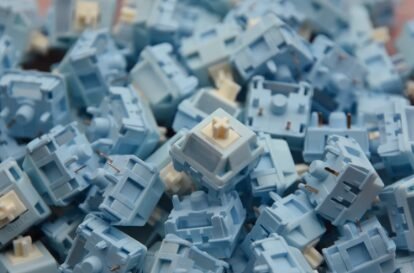
With hot-swap, you can swap in a few Gateron Yellows to try linear, then try some keyboard switches until you find the perfect feel.
2. One Board, Multiple Personalities
Have one keyboard but want different switches for different tasks? In a hot-swappable keyboard, you can:
· Use linear switches on WASD for gaming
· Use tactile switches for the alphas when typing
· Use heavy switches for the spacebar to prevent accidental presses
This level of customization is impossible with soldered boards without significant effort.
3. Easy Repairs
If a switch fails — and they can, especially with cheaper switches — you just pull it out and replace it. No desoldering. No PCB damage risk. For office boards that see daily use, this is a game-changer.
4. No Soldering Required
For beginners, this is the biggest advantage. You get all the benefits of a custom mechanical keyboard — better switches, lubed stabilizers, foam modding — without needing to learn soldering.
Hot-Swap vs Soldered: Which Is Better?
| Feature | Hot-Swap | Soldered |
| Switch swapping | Instant | Requires soldering |
| Cost (board) | Higher ($20–50 premium) | Lower |
| Reliability | Very good (modern sockets) | Excellent |
| Beginner friendly | Yes | No |
| Switch security | Good (firm fit) | Excellent (permanent) |
| Repair ease | Pull and replace | Desolder and replace |
| Modding potential | High | Very high (full control) |
What About the Downside?
Hot-swap sockets have a few limitations worth knowing:
Pin compatibility — Most hot-swap boards accept 3-pin switches only. Some newer boards support 5-pin (the extra two are plastic alignment pins). Check your board’s specs before buying switches.
Potential for loose sockets — Cheap hot-swap sockets can wear out after repeated swaps. Quality sockets from Kailh, Gateron, and Mill-Max are rated for hundreds of insertions.
PCB material — Some hot-swap boards use cheaper PCBs that can flex when inserting tight switches. Always insert switches straight and avoid excessive force.
How to Check If Your Keyboard Is Hot-Swappable
1. Look at the product page — If it says “hot-swap” or “hot-swappable,” you’re good
2. Check the switch — If the switches are visible with clear housings, pull one. If it came out easily with a switch puller, it’s hot-swap
3. Look for sockets — Pop off a keycap and switch; if you see two small metal clips where the pins go, that’s a hot-swap socket
Popular Hot-Swap Socket Types
Kailh Hot-Swap Sockets
The most common type. Found on Keychron, Epomaker, Akko, and many other brands.
· Supports 3-pin switches
· Good durability
· Widely available replacement PCBs
Gateron Hot-Swap Sockets
Similar to Kailh but with slightly different pin spacing.
· Found on some Gateron-focused boards
· Compatible with most MX-style switches
Mill-Max Sockets
These are aftermarket add-on sockets that you solder into any PCB to make it hot-swap.
· Best compatibility (works with any MX PCB)
· Requires soldering (installing the sockets)
· Gold-plated for reliable contact
Optical Hot-Swap
Used on optical switch boards (Razer, Wooting, etc.). These use light-based actuation instead of metal contacts.
Best Switches for Hot-Swap Boards
Since you’ll be swapping switches frequently, choose keyboard switches that are:
4. Easy to insert and remove — Switches with tight housings are harder to work with
5. 3-pin compatible (unless your board supports 5-pin)
6. In stock — No need to wait for group buys if you want to try different options
Good starter switches for hot-swap:
· Linear: Gateron Yellow (50g, smooth stock)
· Tactile: Gateron Brown (45g, light bump)
· Clicky: Kailh Box White (50g, crisp click)
Hot-Swap Maintenance Tips
· Clean sockets every few swaps — dust can affect contact reliability
· Don’t overtighten PCB screws — warping the PCB can misalign sockets
· Use a switch puller — never pull switches with anything else (like pliers)
· Insert switches straight — angled insertion bends pins and damages sockets
Should You Buy a Hot-Swap Keyboard?
Yes, if:
· You’re new to mechanical keyboards
· You want to experiment with different switches
· You plan to upgrade your keyboard gradually
· You don’t solder
Maybe not, if:
· You already know exactly what switch you want
· You’re on a tight budget (hot-swap adds $20–50 to the cost)
· You want the absolute most durable connection (soldered is still more reliable)
For 90% of keyboard users, hot-swap is the better choice. The flexibility it provides is worth the small premium.
____________________________________________________________
Ready to try different switches? Browse our collection of keyboard switches to find your perfect match.